

AI Audio Summary and Discussion
Want to learn about this topic in the background? Give this AI-generated audio summary a listen (created using NotebookLM).
There’s a new set of components in LunchBox for Grasshopper that allows you to serialize and deserialize Rhino and Grasshopper geometry. The Serialize and Deserialize components enable you to:
- Convert geometry into a portable string format (serialization)
- Reconstruct that geometry on demand (deserialization) in new or different Grasshopper files
This opens up streamlined methods for storing and sharing geometry information, which can be particularly helpful when version control, component design, or distributed collaboration are critical. Once serialized, you’re able to export geometry data to text-based documents like CSV files or Excel spreadsheets. This data can be saved to a design database to be leveraged or shared with teammates, collaborators, or across project phases.
Prerequisites
- LunchBox for Grasshopper, Version 2025.05.05 (Release date: May 5, 2025) or newer
- Article: How to install or update LunchBox
- Rhino 8, Service Release 12 or newer
How It Works
Serialize Component
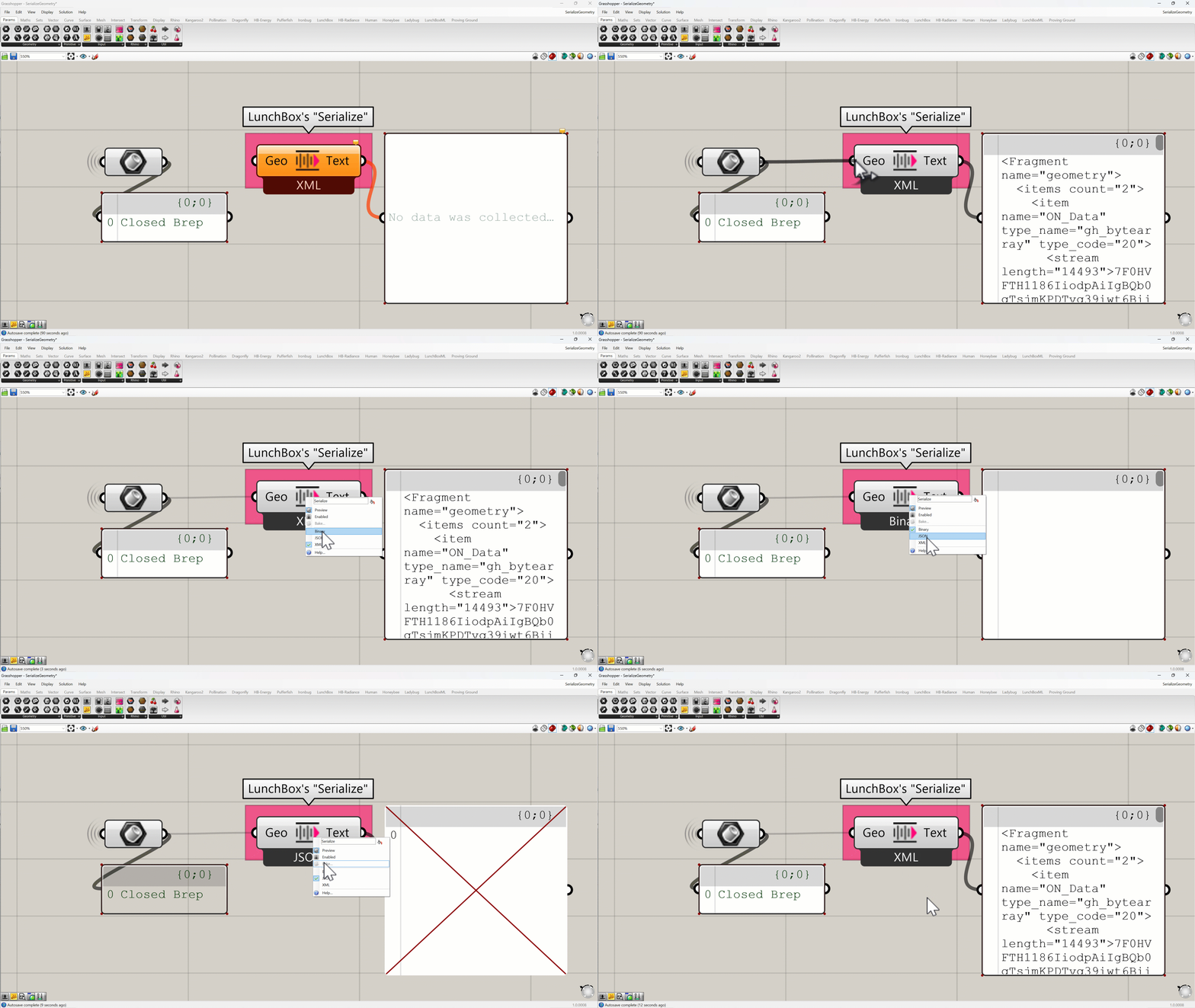
- Input: Geometry (e.g., points, curves, meshes, breps)
- Configure: Right-click on the center of the component to choose the output type: Binary, XML, or JSON.
- Output: A string or set of strings representing the geometry data. Note: JSON data will not be readable in a Grasshopper panel component.
Deserialize Component

- Input: Serialized string data.
- Output: Grasshopper geometry reconstructed from the serialized content
In this example, we are referencing a password-protected Excel file that contains the serialized data from the script above. Note that the newly reconstructed geometry has a different object has than the original geometry. Both hashes are shown in this screen capture.
These components are lightweight, efficient, and plug-and-play with standard Grasshopper data trees.
Example Workflow: Cross-Team Collaboration
- A Facade Designer generates panel geometry in Grasshopper.
- Using the Serialize component, they export geometry as text strings and write them into an Excel or CSV file.
- The file is sent to a Structural Coordinator, who may be working in a separate Grasshopper script. For example, they may be defining slab edges or documenting components related to the facade panel design.
- The Structural Coordinator reads the serialized strings from the file and uses the Deserialize component to instantly rebuild the geometry—ready to be used in structural analysis, visualization, or fabrication logic.
- When changes are made, the Facade Designer overwrites the Excel or CSV file and the Structural Coordinator is able to refresh the data and incorporate the latest changes on demand.
No more copy-pasting geometry or dealing with bloated shared files. Serialized geometry is easy to track, share, version, and archive.
Other Potential Use Cases
Serialization and deserialization of geometry in Grasshopper opens up a wide range of powerful and practical use cases beyond just team coordination. Here are a few other ideas for leveraging text-based geometry data in your Grasshopper workflows:
- Geometry Banking: Store geometry snapshots at key design milestones for version control or reuse. By keeping a lightweight “history” of design states, you can avoid the need to rely on saved GH files.
- Modular Design Strategy: Break complex workflows into smaller, manageable GH scripts connected via serialized data.
- Prefab or Assembly Kit Catalogs: Build a catalog-like design approach, where components can be selected and swapped from a managed database.
- Training AI or Machine Learning Models: Export geometry data along with performance metrics or labels to train machine learning models.
- External Processing: Decouple processing logic from Grasshopper; integrate with broader ecosystems like APIs, cloud compute engines, or simulations for analysis, transformation, or validation.
- Web-to-Grasshopper Pipelines: Capture user input or geometry from a web app (e.g. ShapeDiver, Speckle, or a custom front-end) and deserialize it in Grasshopper for further design development.
We’re excited to see how this feature improves your workflows—whether you’re coordinating with teammates, building parametric toolkits, or future-proofing your design data.
Thanks for following along. Have questions? Reach out to our team at apps@provingground.io.